Heat strategy
A dense bean carries more material behind the same surface area, so energy moves into the core more slowly. Roasters consider density when setting charge temperature and early heat application on a new lot.
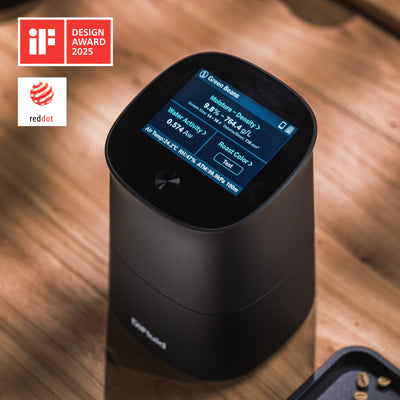
DiFluid Density Meters
How much material is packed into a bean, and how tightly that material rests, how the lot takes heat and how it holds up in storage.


Density describes how much coffee material is packed into a given volume. It is fixed by the seed, and it is one of the few green-coffee figures that describes how the lot will absorb heat.
A dense bean carries more material behind the same surface area, so energy moves into the core more slowly. Roasters consider density when setting charge temperature and early heat application on a new lot.
Density tracks with growing altitude and cell structure. When a lot arrives described as high grown, a reading is the cheapest check you have against the sample actually sitting in front of you.
Green coffee gives up and takes on water depending on where it sits. Bulk density moves with moisture, so a repeat reading on the same lot every few weeks shows what the warehouse is doing to it.
Same farm, same varietal, new crop year. Comparing density against your record for the previous bag tells you whether the profile you already trust still applies, or whether this one starts from scratch.
Omix Plus reports estimated true density and bulk density at the same time.
Air between the beans is subtracted. What is left is the seed.
True density
The density of the bean material itself. Omix Plus photographs the packed sample, identifies the gaps between beans, subtracts them, and runs what is left through a compensation model built against the water displacement method. The result is an approximate true density, accurate to ±1 g/L against that reference.
Because air is excluded, how you filled the container barely touches it. This is the figure that survives comparison across lots, across origins, and across two people measuring in different rooms.
Cross-checked against the water displacement method
The same coffee, measured both ways
Divide the bulk density by the true density and you get 0.752. In other words, about a quarter of Container A was empty space, not coffee. That’s the packing ratio, and it changes depending on how the sample was filled.
True density describes the bean material, so it does not change with how you filled the container. A reading you take today can be set beside one from last month, one from a different lot, or one a colleague took in another room.
Bulk density is the number green buyers, mills, and suppliers already quote, and the one printed on a Sinar or MD500 sheet. Omix Plus is aligned to MD500, so its bulk density fits straight into records you already keep.
Omix Plus returns both, while CoffMeter M1 only reads bulk density.
Fill the container the same way every time. The container is a fixed volume, but how the container is filled determines the weight of your sample. By filling in a repeatable way, you ensure little variance betwen measurements.
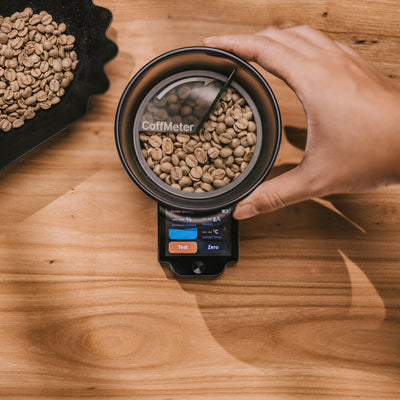
CoffMeter M1 comes with a bean sweeper, to help you prepare the sample repeatably.
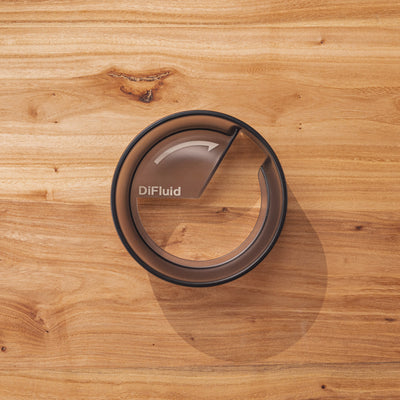
Omix Bean Sweeper is a separate accessory and is not included with Omix Plus. Omix Plus ships with a separate scraper that fits cleanly in the box. The two sweepers are shaped for their own containers and are not interchangeable.
Roasting changes density. The bean expands and loses mass, so a roasted sample has lower density than the green it came from.

Bean Manager keeps track of your beans. Create a green coffee, tap Import on Bean Qualities, pick your device by name, and CoffeeOS pulls test results straight off the device: moisture, water activity, bulk density, true density, screen size, average bean diameter, and average bean volume.
CoffMeter M1 fills the moisture and density blanks the same way.


Roast Color Analyzer Sessions, Particle Analyzer Sessions, Brew Recorder Records, and Selected Recipes all appear in Bean Insights within the Bean's details page. Filter and sort the bean list by any metric in the record, density included.
Neither unit needs a phone in the room. Each one keeps its own test history on the device, up to 500 records, so you can work through a warehouse or a cupping table on your own and import the whole lot into CoffeeOS afterwards.
Both units read moisture and density on green or roasted coffee, and both are imported straight into Bean Manager.

KM 589,31 · Coffee Moisture & Density Meter
Moisture and density on green or roasted coffee, in under two seconds, with the bean sweeper in the box. M1 weighs the sample rather than imaging it, so the density it reports is the packed figure.

KM 4.641,42 · Coffee Quality Analyzer
One fill of Container A returns moisture, water activity, true density, bulk density, screen size, average bean diameter, average bean volume, roast color, and the room conditions the reading was taken in.
| Density and moisture | CoffMeter M1 | Omix Plus |
|---|---|---|
| Optical algorithmically processed | No | Algorithms correct for sample noise |
| Calibration | Automatic on Startup | Calibration containers |
| Also measures | — | Water activity, screen size, bean diameter, bean volume, roast color, ambient conditions |
| Price | KM 589,31 | KM 4.641,42 |


M1 and Omix Plus use the same underlying methods, capacitance for moisture and weighing for density. Omix Plus gives you a much clearer picture of the state of your beans.
A camera reads color, packing state, and the capacitance model is corrected for what it sees.
Using the smallest application of the chilled-mirror-dew-point method ever, Omix measures water activity in the internationally recognized way, in under 1 minute.
The chamber seals during the run, shutting out ambient humidity, dust, and airflow.
Omix Plus is built around the entire roasting loop, measuring color after the roast, all in one unit.
A density meter on its own gives you a number. Connecting to CoffeeOS, gives you a bean entry that the rest of the lineup keeps adding to, from the green analysis through the roast to what came out in the cup.
Omni measures particle size. Microbalance Ti tracks your brews. R2 Extract measures TDS on the finished brew. Each one attaches its session to the same bean, so you can read backwards from a cup you liked to the density of the green it started as.

Omix Plus also measures moisture, water activity, screen size, bean volume, and roast color from a single fill. Everything you need in one unit.
Add water activity and roast color later with CoffMeter W1 and CoffMeter A1 or Omni, when you want them.
If you are comparing lots across farms, mills, or two roasteries, and you need a unit in each place. Three CoffMeter M1 could be right for you.
Currency and language
Purchases in Saudi Arabia go through our partner Black Knight.
Visit black-knight.com to buy. For other questions, or to claim a preorder, contact service@digitizefluid.com.